활동 목표: 인공지능 코드 실습하기(Qwen from Huggingface)
활동 결과:
1. 개요
인공지능 코드 실습이라고 목표를 적어두었는데
거창한 인공지능 학습 코드를 짜는 것이 아닌
허깅페이스에서 가이드대로 코드를 작성해서 모델을 불러와 사용해보는 것 뿐이다.
위 활동의 진짜 목표는 언어 모델이 동작하는 흐름을 파악하는 것이다.
2. 모델 분석하기
먼저 사용할 모델은 Qwen3-0.6B 이다.
코드를 하나하나 뜯어보자!
from transformers import AutoModelForCausalLM, AutoTokenizer

model_name = "Qwen/Qwen3-0.6B"
2.1. load the tokenizer and the model
tokenizer = AutoTokenizer.from_pretrained(model_name)
model = AutoModelForCausalLM.from_pretrained(
    model_name,
    torch_dtype="auto",
    device_map="auto"
)
먼저 이 코드에서 볼 내용은 Auto Class이다.
Auto Class는 특정 모델의 아키텍쳐, 체크포인트(모델 가중치), 규칙 등의 파일을 동일한 코드로 불러올 수 있도록 해 주는 것이다.위 코드에서는 AutoTokenizer, AutoModelForCausalLM이 사용된다. 이 두 가지에 대해 알아보자.
AutoTokenizer → text to token 에 필요한 것들을을 자동으로 로드
위 코드에서 AutoTokenizer가 로드하는 것들:
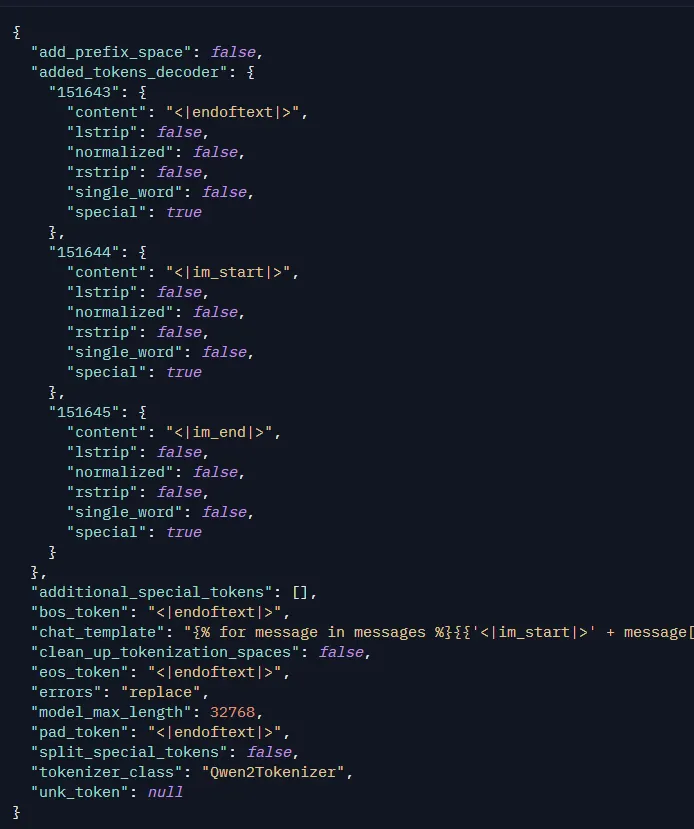
- tokenizer_config.json # 토큰 설정 값(규격, 특수 토큰 등) <- 2.2에서 추가 설명
- vocab.json # 단어와 숫자가 매핑되어있는 vocab 로드
- merges.txt # 글자 결합 규칙(BPE 라는 알고리즘을 이용하여 lowest를 l o w e s t로 쪼갠 뒤 low est로 분리함) 로드
- tokenizer.json # 빠른 통합 토크나이저 파일 로드
이를 통해 단어를 쪼개고 합친 뒤, vocab에서 합쳐진 단어를 찾아 숫자로 토큰화시키는 것이다.
tokenizer_config.json 은 다음과 같은 형를 띈다.
그 다음으로 AutoModelForCasualLM이다.
AutoModelForCasualLM → 모델 로드
위 코드에서 AutoModelForCasualLM이 로드하는 것들:
model.safetensors # 모델의 구조 로드(신경망)
generation_config.json # 모델의 가중치 로드(from_pretrained())
기존에는 이와 같이 사용할 모델마다 다른 파일을 일일히 로드해야 하는 불편함이 있었다.
AutoClass를 통해 간편하게 모델에 맞는 파일을 한 번에 로드할 수 있게 되었다!
2.2. prepare the model input
prompt = "Give me a short introduction to large language model."
messages = [
    {"role": "user", "content": prompt}
]
text = tokenizer.apply_chat_template(
    messages,
    tokenize=False,
    add_generation_prompt=True,
    enable_thinking=True
)
model_inputs = tokenizer([text], return_tensors="pt").to(model.device)
위 코드에서 살펴볼 내용은 apply_chat_template()이다.
우선 그 위부터 보자면, 프롬프트를 role, content로 정의된 딕셔너리에 content로 넣는다. 그런 messages를 apply_chat_template로 넘겨준다.
apply_chat_template는 위에서 보낸 프롬프트를 가공하는 것이다.
하이퍼파라미터를 통해 토큰화, special token 여부, 이 모델의 경우에는 추론 과정 여부를 결정하였다.
그리고 이 텍스트를 토큰화시켜 모델이 처리하는 메모리와 같은 위치에 올려준다(.to(model.device))
위 코드를 실행시킨 뒤 text를 출력시켜보면 다음과 같이 출력된다.
print(text)

->>
<|im_start|>user \n Give me a short introduction to large language model.<|im_end|> \n <|im_start|>assistant
여기 보이는 <|im_start|>와 같은 형식이 special token이다.
special token이란 간단히 말해서 모델에게 신호를 전달해주는 것이다.
대표적으로 여기서부터 문장의 시작이다. 여기까지가 문장의 끝이다. 여기서부터 모델의 답변이다. 와 같은 신호를 준다.
이런 토큰들은 앞에서 나온 tokenizer_config.json의 규칙에 따라 사용되는 것이다.
출력된 text결과를 보면 또 익숙한 모습이 보이는데 바로 시작 토큰 바로 뒤에 있는 user이다.
앞에서 설정한 role: user가 여기에 나온다.
그리고 프롬프트가 끝난 뒤에 모델이 답변을 하는 위치에는 새로운 시작 토큰과 assistant라는 것이 보인다.
여기의 assistant가 바로 모델의 role이다.
role은 여기에 없는 하나가 더 있는데 바로 system이다.
user가 모델에 요청하는 프롬프트, assistent가 모델의 답변을 의미하면 system은 모델의 인격 설정과 같은 역할을 한다.
2.3 conduct text completion
generated_ids = model.generate(
    **model_inputs,
    max_new_tokens=32768
)
output_ids = generated_ids[0][len(model_inputs.input_ids[0]):].tolist()
앞의 text를 토큰화시킨 model_inputs을 통해 답변을 생성한다.
언어 모델이 답변을 생성시키는 자세한 과정은 추후 다른 시간에 설명하도록 하겠다.
2.4. parsing thinking content
try:
    # rindex finding 151668 (</think>)
    index = len(output_ids) - output_ids[::-1].index(151668)
except ValueError:
    index = 0

thinking_content = tokenizer.decode(output_ids[:index], skip_special_tokens=True).strip("\n")
content = tokenizer.decode(output_ids[index:], skip_special_tokens=True).strip("\n")

print("thinking content:", thinking_content)
print("content:", content)
이 마지막 과정은 일반적인 과정은 아니고 추론 과정과 답변을 출력해주는 코드이다.
추론 special token의 토큰화된 번호를 찾아 디코딩해 모델이 답변을 생성할 때 어떤 과정을 거쳤는지 자연어로 출력해준다.
실제로 프롬프트를 다음과 같이 변경한 뒤 추론 과정을 보면 매우 흥미롭다.
thinking content: <think>
Okay, let's see. The question is 5 plus 12 times 25. Hmm, so I need to figure out the order of operations here. Wait, right, in math, when there's multiplication and addition, you usually do the multiplication first, right? So the order of operations is parentheses, exponents, multiplication and division, and then addition and subtraction. But in this case, there are no parentheses or exponents, so I guess I just need to do the multiplication first.

So the problem is 5 + 12 * 25. According to PEMDAS, multiplication comes before addition. So I should first calculate 12 multiplied by 25. Let me do that. 12 times 25... Well, 10 times 25 is 250, and 2 times 25 is 50, so adding those together gives 300. So 12 * 25 equals 300. Then I need to add 5 to that result. So 300 plus 5 is 305.

Wait, let me double-check. Maybe I made a mistake with the multiplication. 12 times 25. Another way to think about it is 12 times 20 is 240, and 12 times 5 is 60, so adding them together gives 240 + 60 = 300. Yep, that's the same. Then adding 5 gives 305.

Is there any chance I misread the problem? Let me check again. The original problem is 5 + 12 * 25. Yes, that's correct. So no parentheses or anything else. So the answer should be 305. I think that's right. I don't see any other steps here. Maybe if there were division or something else, but here it's straightforward. So I'm confident the answer is 305.
</think>
content: 5 + 12 * 25
First, perform the multiplication:
12 * 25 = 300

Then perform the addition:
300 + 5 = 305

**Answer:** 305
이번 활동을 통해 언어 모델이 답변을 생성하기까지의 과정을 훑어보았다.
이 Qwen3-0.6B 모델은 추론 과정을 특화하여 매우 흥미로웠다.
이번 활동을 기점으로 더욱 자세히 언어 모델의 매커니즘을 공부할 계획이다!
참고자료
'모각코' 카테고리의 다른 글
| [2025 동계 모각코] 3회차 활동 결과 - Fine tuning과 Domain Adaptation (0) | 2026.01.12 |
|---|---|
| [2026 동계 모각코] 2회차 활동 결과 - Transformer 제대로 이해하기 (0) | 2026.01.07 |
| [2026 동계 모각코] 모각코 활동 계획 (0) | 2026.01.01 |
| [2025 하계 모각코] 모각코 회고 (1) | 2025.08.17 |
| [2025 하계 모각코] 6회차 활동 결과 - 운영체제와 운영체제의 구조 (1) | 2025.07.31 |